Home tab
The ‘Home’ tab of the tool provides the link to this official documentation, the possibility to load previous experiment or results files, and gives small explanations of each step of the pipeline.
Results file (Load Experiment)
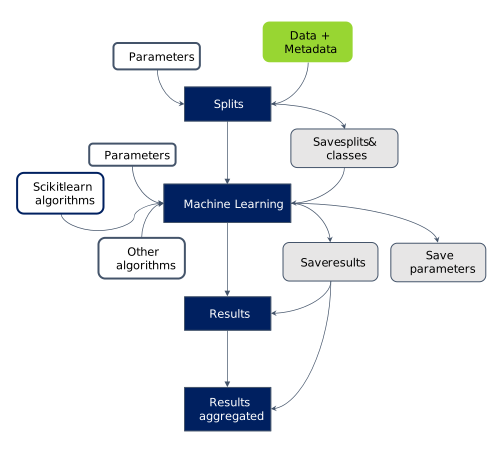
To allow better modularity of the experiments, the two major steps (splits setup and ml results) of PICO are saved independently into pico_splits and pico_ml files. Moreover, the data and metadata are only saved (dumps) in a local repository which enables sharing the results file to outside collaborators.
To continue an experiment and/or visualize results, PICO offers the possibility to load a .mtxp file. To prevent any problem between a local data dump and a potentially different saving file, a hashing process takes place to compare the file being loaded and the local dumps of data.
- Load results
- Select this option if you only want to visualize the results of a previous experiment. No need to provide data or metadata. It is not impacted by the hashing verification.
- Partial restore
- Select this option if you want to use the same splits parameters (except classification design, targets and sample id columns), but with other designs or data. It means you have to go through the Splits tab and specify missing informations (designs, data matrix, etc.).
- Full restore
- Select this option if you want to fully reproduce an experiment, you will need to give the same data and metadata matrices as the original experiment.
Once an option is selected, and no warning message appear, the disappearance of the pop up modal indicates that everything is correctly loaded and ready to use.
Analysis pipeline
In the Splits tab, the user gives the data file and a metadata file (optional), defines classification designs and select the different options and parameters. A first saving file is created. Then in the Machine learning tab the user can choose the machine learning algorithms and the options for the hyperparameters optimization. A second saving file is created. At the end, the user can analyse the results with the two last tabs : ‘Results’ and ‘Results aggregated’.